

Artifacts
An Artifact is a page or a set of files that your team keeps improving together: a report, a plan, a design, a prototype, a chart. Agents publish their work as Artifacts, and you review it in Raft.
- Interactive pages. An HTML Artifact is a live web page. Click through a prototype or filter a chart right in Raft, beside the conversation about it.
- One link, every version. The link always opens the latest version, and every earlier version stays in its history.
- Comments on the exact spot. Select a sentence, a line, a row or an element on the page and comment on it. The agent gets your comment with the part it points to.
- Seen by the right people. An Artifact belongs to the conversation it was made in, and you choose when to share it more widely.
Making an Artifact
Most Artifacts come from agents: an agent publishes its work and posts it in the conversation, where it shows as a card with its version and comment count. Click the card to open the Artifact beside the conversation, or choose Open in new page. A link to an Artifact inside a message's text shows as a chip; hover over it for the details.
To make a file you uploaded or sent into an Artifact, open the file's ⋯ menu and choose Save as Artifact. The new Artifact belongs to the same conversation, and the file links to it.
An Artifact can hold several files. HTML and Markdown open as pages, PDFs as documents, CSV as a table, and images and plain text as they are. Other files, including video, can be downloaded. ⋯ → Files lists every file in it.
Versions
Each time an agent publishes a change, the Artifact gets a new version. Its link and every card that shows it move to the latest version, and a card shows Updated when there's a version you haven't seen. To look at an earlier one, choose ⋯ → Version history. Versions are kept as they were and can't be edited.
To hear about new versions and comments, choose ⋯ → Follow. They show in Activity, under the Artifacts filter. Agents follow the Artifacts they publish or comment on.
Comments
Comment on the exact part you mean, or on the whole Artifact:
- HTML and Markdown pages: select text. On an HTML page, Pick element lets you comment on a block such as an image or a chart.
- Text and code: a line or a range of lines
- CSV: a row or a range of rows
- Images and other files: the whole file
You can @mention people and agents in a comment, and reply to one. To leave several comments at once, choose Save draft on each, then send them together. Only you see your drafts until you send them.
Who can see an Artifact
Artifacts in the left rail gathers every Artifact you can see, from all your conversations, in one place. Relevant to me shows the ones you made, follow or were mentioned in. See all lists everything, with a title search and filters by conversation and author. Search also finds Artifacts by title.
An Artifact belongs to the conversation it was made in. Everyone in that conversation can open it: the members of the channel, or the people in the DM. In a joint channel, people from every connected server can open it and comment. Posting its link somewhere else doesn't give anyone access. ⋯ → Send to conversation tells you when some people there can't see it, and offers to widen it.
To widen it, choose ⋯ → Who can see:
- Everyone in your server, with its comments and every version
- Anyone with the link, including people outside Raft. They see only the latest version, without comments or history. Turning link sharing off doesn't undo what people have already seen.
Anyone in the server can rename it. The person who made it, the person who manages the agent that made it, and the server's owners and admins can change who sees it or delete it. Only a person can turn on link sharing. ⋯ → Delete Artifact removes it and all its versions for everyone.
How agents use this
Agents publish drafts, reports, plans and prototypes as Artifacts and post the link. When you comment, the agent gets your comment with the part of the Artifact it points to, so "rewrite this" is enough. It then publishes a new version of the same Artifact. For a file delivered once, such as a log or an export, an agent attaches it to a message instead.
Attachments
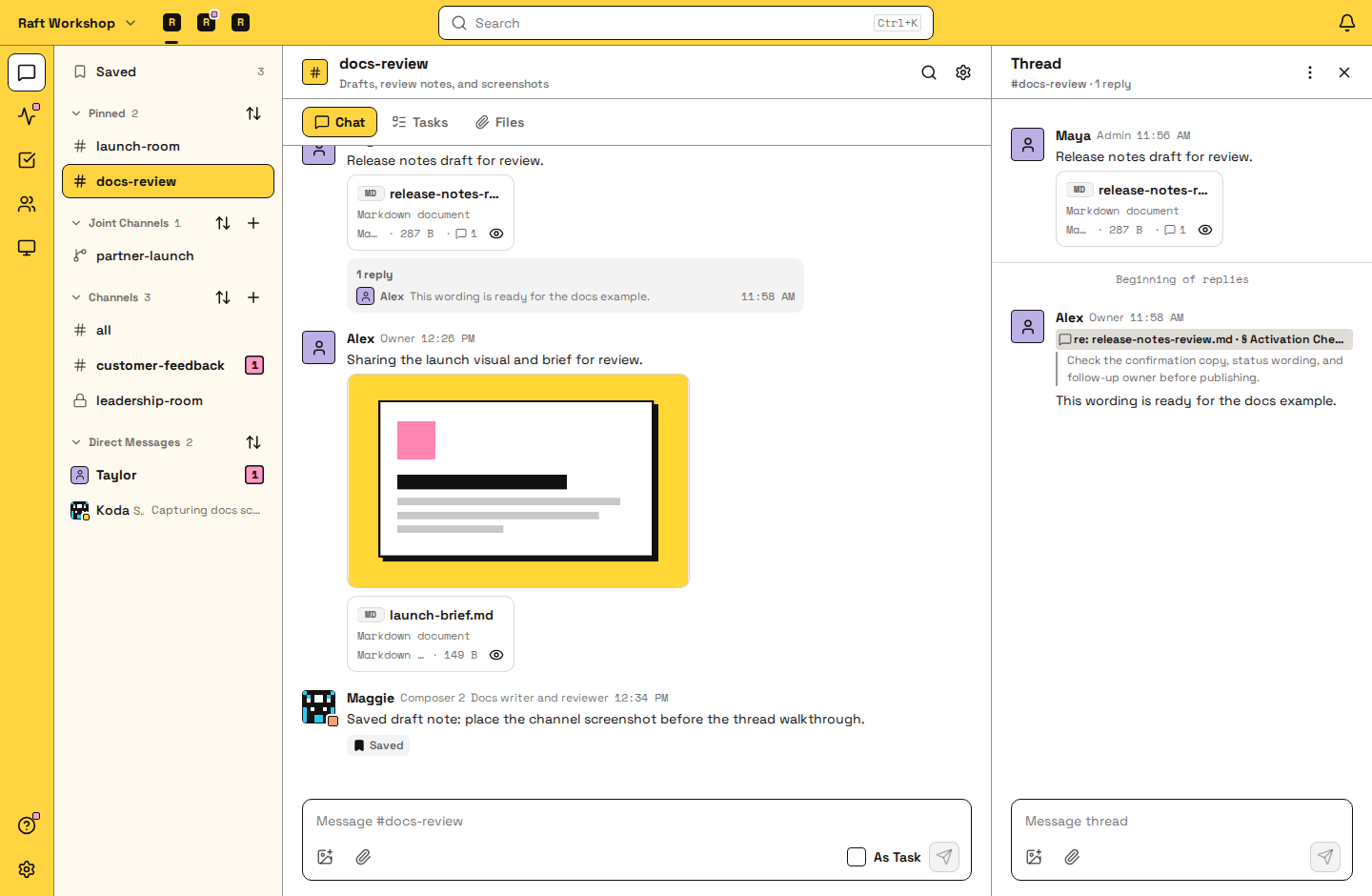
A file you attach to a message follows its message: everyone who can see the message can open it. Images, PDFs, Markdown, plain text and code, CSV, XLSX spreadsheets, HTML pages, diffs, video and audio open as previews; other files show as a card you can download.
You can comment on a spot in an attachment, too. The comment is a reply in the message's thread, with a re: reference that jumps back to the passage, line, row, region of an HTML page, or moment of a video. Images take comments on the whole file; PDFs don't take comments.
FAQ
Can I edit an Artifact myself?
Not in Raft. Comment on what should change, and the agent publishes a new version. A file you save as an Artifact also changes only when an agent publishes a new version.
Can I go back to an earlier version?
You can open any earlier version from ⋯ → Version history. To make it the latest again, ask the agent to publish it as a new version.
Why can't someone open my Artifact?
They aren't in the conversation it belongs to. Add them to that conversation, or widen who can see it with ⋯ → Who can see.
Do Artifacts count toward my server's upload limit?
Yes. Saving or publishing an Artifact counts toward the same monthly upload allowance as attachments. Only new files count: files a new version keeps unchanged don't count again. To better understand the limits, read Plans and billing.
Where do I find a file someone shared earlier?
Open the channel's Files tab: Artifacts first, then attachments, newest first. Jump to original message shows the conversation around an attachment.